Dashboard
The web UI for browsing, searching, and curating shared memory.
The dashboard is the web UI for browsing and managing shared memory. It runs
alongside the memory server (in a development checkout, bun dev from the repo
root starts everything and serves the dashboard on port 3100) and signs you in
with a Supabase account — register a new one or use a provisioned account on
the login page. When the instance has GitHub or Google enabled, the login page
offers them as buttons above the fields; an account is one per email, so a
provider sign-in with the address of an existing, confirmed account opens that
account rather than a second one. A page you were sent to the login form
from is where you land afterwards.
Connecting an agent runs through the dashboard too. When an MCP client asks for access, the browser opens a consent screen here that names the client, lists everything it will be able to do as you (memories, the knowledge graph, conflicts, rules, project boards, project descriptions, conversations and metrics), and shows where the browser returns afterwards and which account is deciding; Allow lets it in and Deny refuses. A client you allowed before reconnects without the screen when it returns to the same address and the browser arrived on its own, as it does when the client opens the link; a page elsewhere that sends your browser there, or a different return address, shows the screen again. The client's name is its own claim and the screen says so. Each agent holds a session of its own, so signing out of the dashboard leaves connected agents working. Connected agents in Settings lists every client you allowed, one row per client with the return address you allowed it for, when you allowed it and when it was last active, so two installs of the same agent show as two rows. Revoke takes access back at once: the client's sessions end, the memory server and the database refuse the token it still holds, it cannot refresh, and connecting it again shows the consent screen.
Every screen shares the same chrome. The zero-memory wordmark and the nav sit on the left. In the top-right are the signed-in account, a theme switcher (light, dark, system), and a Sign out button. The account is shown by its display name when one is set in settings, otherwise by the address's local part, with the full address one hover away. Everything you see is filtered by row-level security, so you only ever see your own private memory plus whatever is shared into scopes you belong to. See Scopes and isolation for how that model works.
While a page waits on the server (a save, a refresh after one, moving to another screen), a thin bar runs along the very top of the window. It appears only when the wait is long enough to notice, about a fifth of a second, and leaves once the page has updated. Background prefetching and live updates do not light it.
The screens
- Insights (
/) shows what memory is doing for you: value, quality, health, and how the corpus ages. See Insights. - Memories (
/memories) is the memory feed, with filters and advanced search. Described below. - Board (
/board) shows the cards agents keep for a project, in columns by state, each with its severity as ticks under its label, its type as an icon before them, and the reason it was moved. It is read-only: cards move through the tools. See Project board. - Entities (
/entities) holds the knowledge graph's nodes. Described below. - Scopes (
/scopes) is team sharing and scope management. Described below. - Review (
/review) lists pairs of conflicting memories (duplicate, supersede, contradiction) that automated hygiene could not resolve on its own, presented side by side with the judge's verdict and rationale for your decision. - Rules (
/rules) collects standing-rule candidates from the rules incubator. Review drafted rules, promote or dismiss them, pin the ones that must always be delivered, and see the "Delivered N of M" delivery budget per layer. Filter by pinned and by delivered to list exactly the rules a session receives, or the promoted ones it does not; a rule that moved with its memory, or whose memory is gone, is flagged on its card. - Reflections (
/reflections) holds clusters of related episodes distilled into one consolidated fact, awaiting your approval. See Decay, reflection, and reinforcement. - Portability (
/portability) proposes project-scope memories the judge deems portable world knowledge for a move into your core scope. Nothing moves without your decision. - Activity (
/activity) is the memory activity log: every recall run against your memory in the last 30 days, with hit / empty / error outcomes. See Insights for how it relates to the metrics. - Settings (
/settings) holds your profile — the read-only sign-in address and an editable display name the dashboard shows in place of it, where saving takes effect immediately and clearing it restores the fallback — plus export and import of your memory, your own model-provider key, two-factor authentication, the agents connected to your account, and account deletion. Two-factor authentication adds a code from an authenticator app after every sign-in — six cells in the middle of the step that take a typed, pasted or autofilled code and send it as soon as the last digit is in, with no button to press (Enter sends a complete code too), dimmed while the code is checked — and until the code is given a sign-in reaches nothing: not the dashboard, not the memory server, not a single memory or card through the database. The code also stands before the consent screen for agents and a password reset; removing the app asks for a code from it. Agents you have allowed keep working without a code: the session each one received from the consent screen is on record as an agent's. Turning two-factor on, or changing your password, signs out the agents connected before it, so each of them authorizes once more and gets a session of its own; giving the code when you sign in does not sign them out. Account deletion happens only here — the memory server offers agents no tool for it — and needs two-factor turned on and the code given in this session, besides the exact address. An agent you allow acts with a real session of your account, so what keeps it from deleting the account, changing your password or connecting more agents is a code it does not have, and the dashboard refuses an agent's session outright: turn two-factor on before you connect agents. On an account without it, an agent's session could set up a factor of its own.
Activity and Settings sit at the bottom of the sidebar; the rest are the primary navigation.
Memories
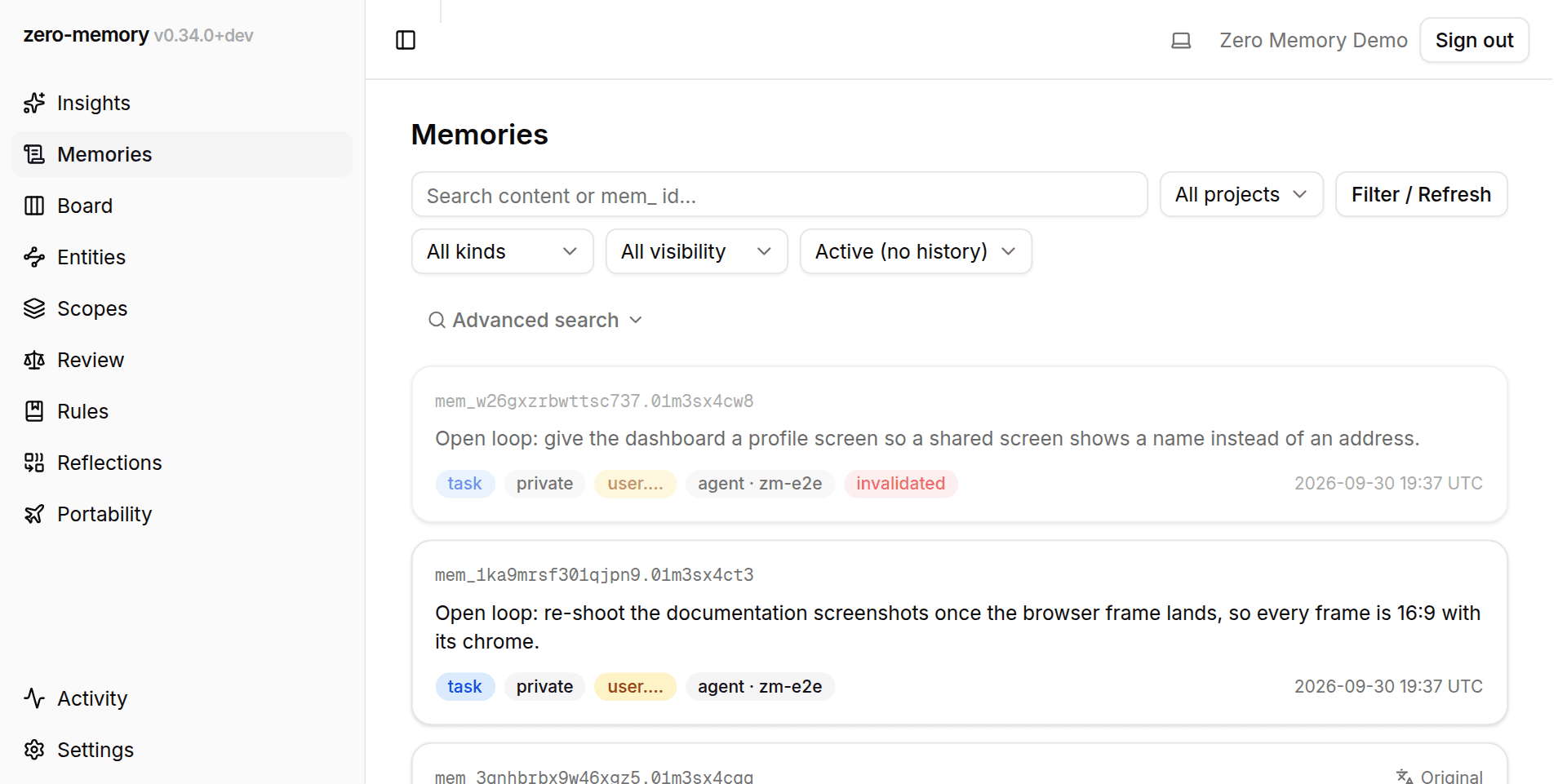
The /memories screen lists every memory visible to you, newest first, in
pages. The root / is the Insights dashboard.
A filter bar sits above the feed. Search content or mem_ id… is a
free-text filter over the memory text; paste a memory id, or any copied
fragment of one, and it finds that memory by prefix instead. All kinds
narrows to one kind (fact, preference, decision, convention, gotcha,
reference, episode, task, open-question). All visibility shows only
private or only sharable memories, and All projects narrows to one project
scope, offered by name or by its alias. Filter / Refresh applies the
current search box and dropdowns, and doubles as a feed refresh when nothing
changed.
The feed follows the agents while it is open. A memory written, retired, rewritten or moved while you watch shows up in its place without a reload, and the current search and filters apply to it as to the rest of the feed. A page opened moments ago starts following a few seconds late.
The Lifecycle status dropdown defaults to Active (no history), which hides superseded historical versions but keeps memories retired without a successor, dimmed and badged, so a disappearance stays observable. Live only drops those too; for the loop kinds (task, open-question) that reads as "only what is still open". Other values show superseded versions only, lone invalidations only, or everything.
Every value in these dropdowns carries a count of how many memories it would yield under the other filters; a value that would yield none is greyed out rather than removed, and the value currently applied always stays selectable. The filters follow the selection: opening a card and coming back restores the same filtered view, and page links preserve it too.
Each memory renders as a card with its text, a kind badge, a sharing badge
(private, sharable, or shared, where "shared" means the scope actually has
members beyond the owner), its scope, who authored it (a human or an agent,
with the writing client where known), and when. The scope is rendered in the
collapsed badge form, with the per-owner id segment folded to …
(proj.….api) since it is identical on every scope you own; the full path
lives on the scopes page and behind a hover. A memory that is part of a
supersession chain carries a history badge, a retired memory renders dimmed
with an invalidated badge, and a memory captured in another language reveals
its original text below the canonical English. A fresh account shows
"No memories visible for these filters." until memory is written: by an
agent through MCP, by the background watcher, or shared to you by a teammate.
Selecting a card opens its detail view with full provenance, lifecycle (the validity window and version history), linked entities, and links, plus every owner action in one row: share into a scope, forget, promote to rule, and move to a project. Path-valued provenance fields show the file's basename with the full path behind a hover. The directories above a file describe the machine that ingested it, which is exactly what a shared screen should not display. On a shared memory, a See who can access this dialog lists the scope's members and their roles.
A memory in the wrong scope is moved from its own card, with Move to a project on the memory page. There is no bulk repair surface: a write the server cannot place is refused rather than stored somewhere else, so memories no longer accumulate in the wrong scope for a batch tool to sweep up later.
The same screen also hosts advanced search, a ranked, relevance-scored search that uses the exact same retrieval machinery agents use.
Entities
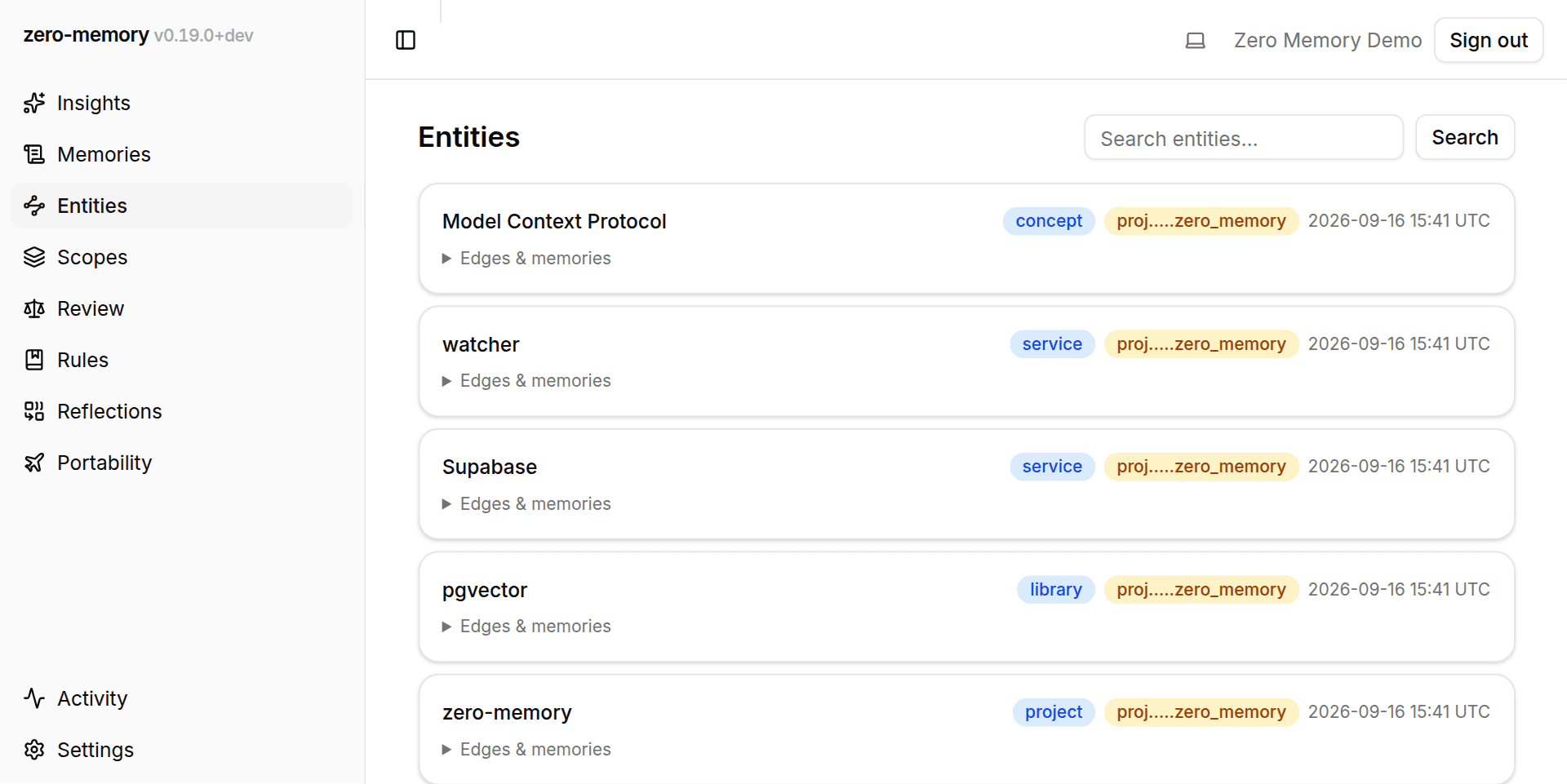
The knowledge graph's nodes. Entities (people, projects, repos, packages, services, tools, libraries, concepts) are extracted from memories and linked to each other by typed edges. The Search entities… box and its Search button find an entity by name.
Each entity shows its name, type, and scope; expanding one reveals its edges (both directions) and the memories that mention it. Like memories, entities are scope-filtered, so a new account shows "No entities visible." until memory containing entities is captured.
Scopes
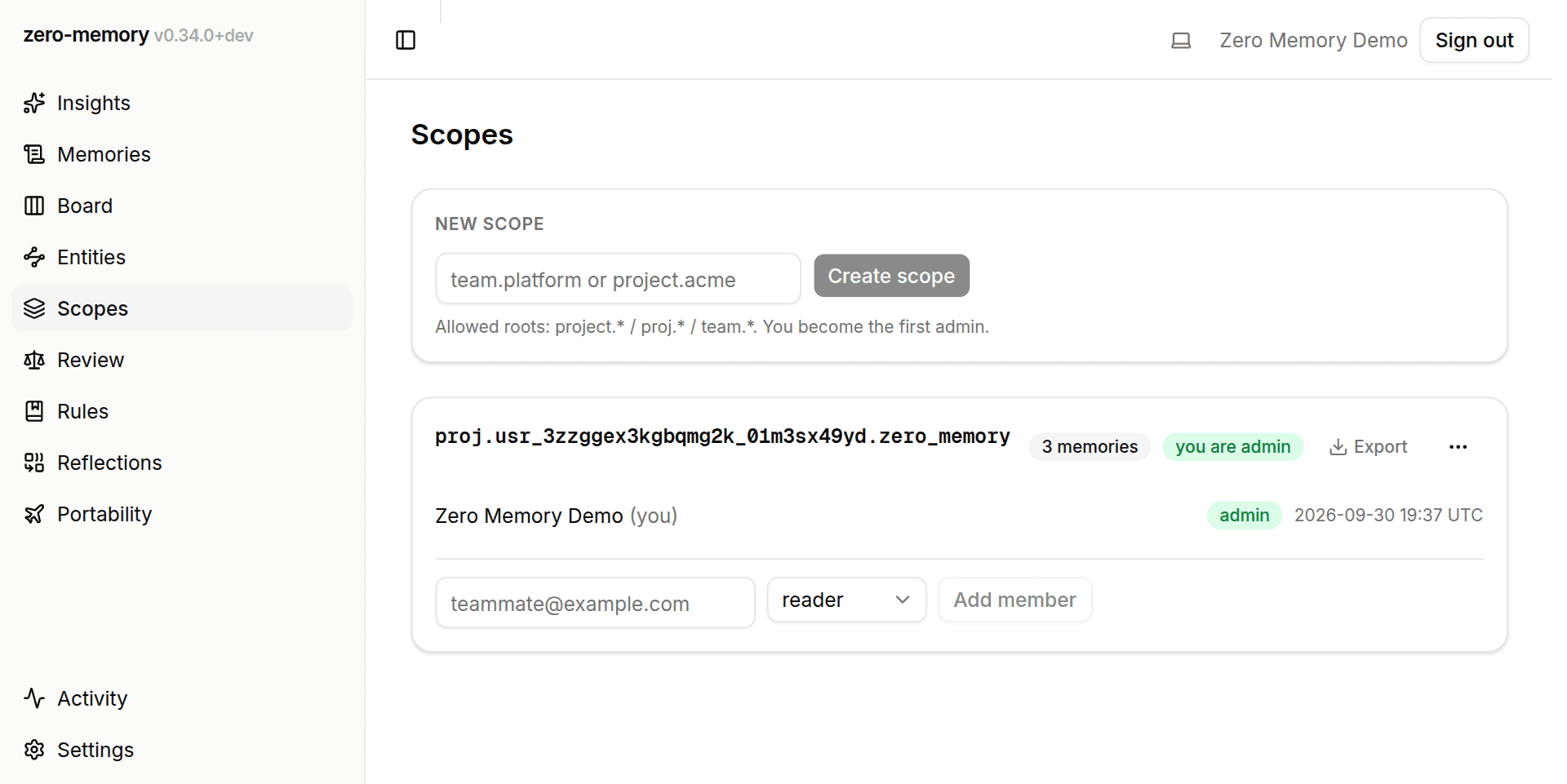
Where team sharing is managed. A scope is a named container that memory can be shared into; membership in a scope is what lets you see its shared memory.
New scope creates one under the project.*, proj.*, or team.* root.
Shareable scopes are namespaced per creator, so the path lives inside your own
owner subtree and the creator automatically becomes the scope's first
admin. Below the form, each scope you belong to is a card: a memory count,
its members and their roles (reader, writer, admin), and, where set, a display
alias and description. The card title links to the memory feed filtered to
that scope, and any scope can be exported as a Markdown .zip.
Admins get more. They can add members by email and assign roles, revoke a member's access, edit the alias and description (or have them generated), rename the scope's last label, merge the whole scope — memories, entities, members — into another scope they administer, or delete it outright.
A new account may already have a project scope created automatically on its first project-routed write. Until another member is invited, that scope is shareable but visible only to its creator.
Insights
Beyond browsing, the dashboard measures what memory is doing for you: tokens saved, recall quality, and memory health, aggregated over a chosen time window. See Insights.
Where memory comes from
The dashboard is for reading and curating. Memory is written elsewhere and
shows up here. Any MCP client (Claude Code, Cursor, …) connected to the server
writes memory with the remember tool and reads it with recall /
build_context; see the memory model. The
watcher and hooks add an opt-in transcript transport that feeds usefulness
metrics and can run model extraction when ZM_INGEST_EXTRACT=on, though
extraction is off by default: the normal high-precision write path is the
in-session agent calling remember proactively. Memory a teammate shares into
a scope you belong to appears in your feed, live, as it is written.