Search
Ranked memory search in the dashboard, with full parity to agent recall.
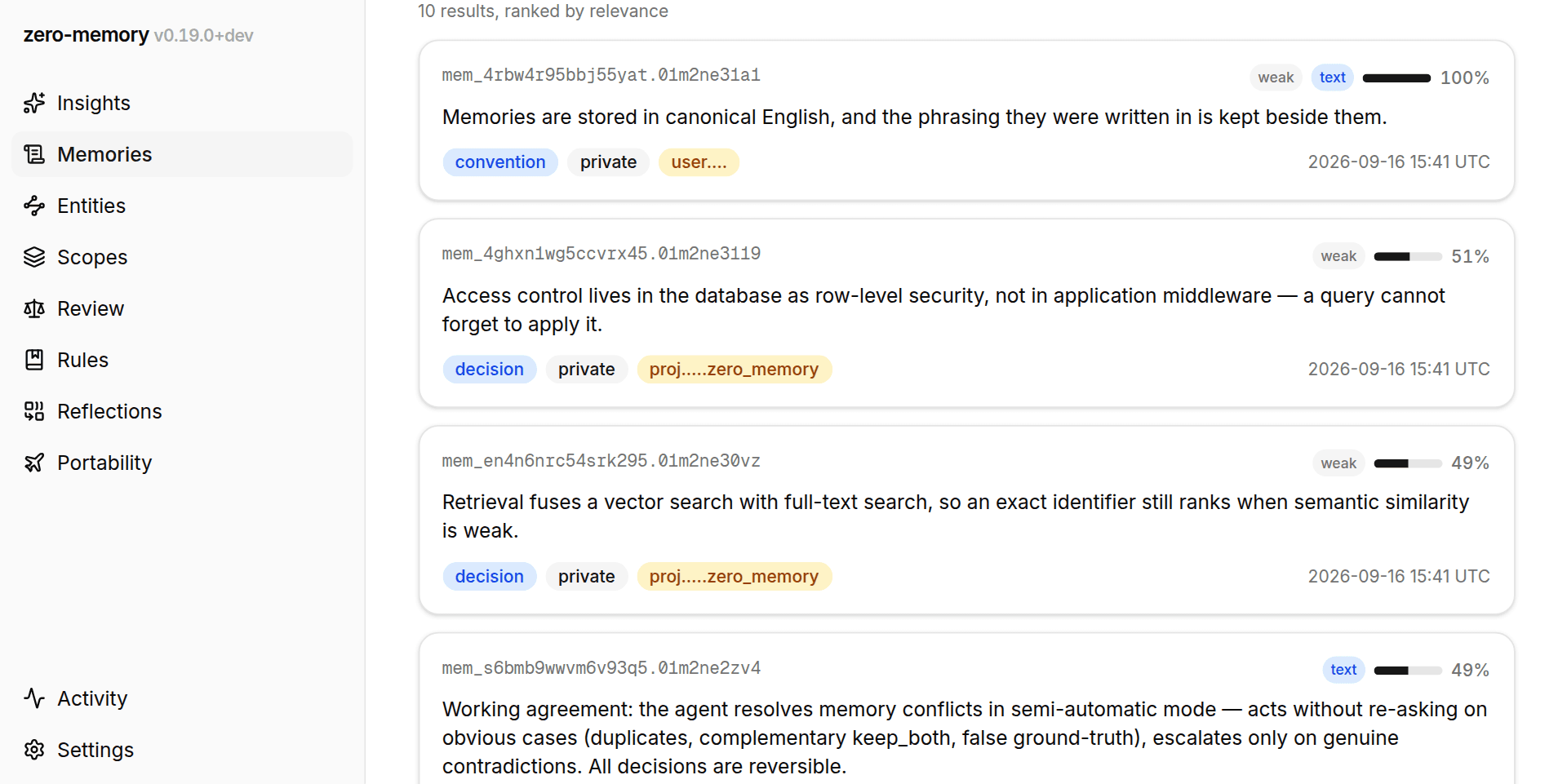
The dashboard's advanced search lets you ask memory a question by hand and see exactly what an agent would see. It lives on the Memories screen: the Advanced search button expands a multi-line input with its own controls, and running a query switches the feed into a ranked-results mode.
Parity with recall
The guiding principle is parity: there is no "simplified search for humans".
A dashboard query runs through the same recall machinery agents use over MCP,
with the same hybrid ranking, the same kind and
scope filters, and the same scores. Given the same arguments, the dashboard
returns the same results in the same order as a direct recall call from an
MCP client.
This makes the search useful in two ways. It answers a quick "what does memory know about X?" check without involving an agent, and it gives you a manual way to verify retrieval quality: if a fact you expect near the top ranks low, you are seeing exactly what an agent experiences. See Recall quality for how retrieval quality is measured and improved over time.
Search runs as the signed-in user under row-level security: results only ever include your own memory and memory shared into your scopes.
Running a query
- Query input, multi-line: press Enter to search, Shift+Enter for a line break. Search fires on Enter or the button, not per keystroke, because every query computes a server-side embedding, so queries are deliberate rather than incremental.
- Kind chips restrict results to one or more memory kinds (fact, preference, decision, convention, gotcha, reference, episode, task, open-question).
- Scope select restricts results to a single project scope.
- Top-k sets how many results to return: 5, 10, 25, or 50. The default is 10
and the ceiling is 50, matching the
recallcontract.
While a query runs the panel shows a loading state; an empty result set shows a meaningful empty state with a hint rather than a blank feed.
Reading the results
Each result renders as a memory card (text, kind, scope, sharing badge, and a disputed marker where relevant) plus two ranking signals.
The score badge and mini-bar carry the fused relevance score, normalized so the top result reads as 100%. Raw fused scores are small and hard to compare at a glance; normalization shows relative rank while the raw value stays available in the badge's native tooltip. Match-strength chips are the absolute signals that survive rank fusion: a semantic-similarity chip (strong / medium / weak) and a text chip when the full-text leg matched. Rank alone hides how strong a match is. These chips restore that information.
The text leg matches gradually rather than all-or-nothing: results covering more of your query terms rank higher, and complete matches sort ahead by construction, so a query with one off-target word does not blank out otherwise-good hits.
Deep links
A ranked view is fully encoded in the URL, in ?search=, ?kinds=, ?sscope=
and ?k=, so a search can be shared with a teammate or re-run later by opening
the link. These parameters are separate from the feed's narrow filters, so a
deep link always reproduces the ranked view. Opening a memory from a result
card and going back returns to the same ranked view, not a reset feed.
Non-English queries
Stored memory content is canonical English, so an English query retrieves best. The search runs exactly what you type: the dashboard does not detect a language, does not translate, and does not substitute a query of its own. A search in a language the corpus is not written in will find little — the full-text half cannot match across languages at all — and the remedy is to rephrase in English.
This is deliberate. Translating on your behalf would mean the text you typed and the text that was searched are two different things, with only the second one explaining your results; every surface that reports a search would then have to show both. One string, shown everywhere, is worth more than a rescued query. See Canonical language.
Search and your metrics
Dashboard searches are attributed to the web client, and agent-facing metrics on the Insights page exclude them, so manual exploration never skews measurements of how well memory serves your agents. Web searches remain visible, correctly attributed, in the memory activity log on the Activity screen.